This page displays the technical drawing for the current subcategory
variant. It also display the description of the products contained
in the drawing.
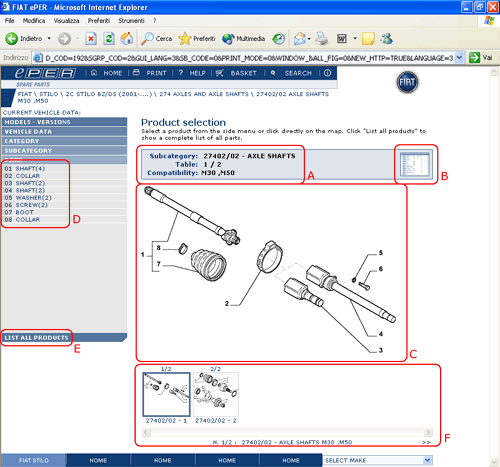
The following gives explanations of the various areas which
make up the page.
A
Table heading. Gives the subcategory of the page,
the number of variant ( e.g.: /00), compatibility
information (e.g: M1,M2) and the progressive order
of the table.
B
Clickable
area which allows activation of product details
pages (see section 5.3.9)
C
Go
to product detail page. The reference numbers
are directly selectable. If you click on the reference
number the product details page is displayed (see
section 5.3.9) containing
specific information for the product
D
Description
of products. Selecting a specific product displays
product details page (see section
5.3.9 link) containing specific information
for the product
E
Has
the same function as B. That is; it activates
the product details pages that make up the table
(see section
5.3.9)
F
Drawings
list. This area contains a sequence of all drawings
(in a reduced format) that have been previously
requested by the user. Depending on the choices
made in the category and subcategory selection
this area can contain:
• A list of all the drawings in a category (e.g.:
274)
• A list of all the drawings in a subcategory
(e.g.: 27404)
• A list of all the drawings in a specific subcategory
(e.g.: 27404/01) }
Moving the mouse over each image displays a popup
window with the complete description of the drawing
and its compatibility information (e.g.: “GD:
right-hand drive”)
This list can contain many images accessible by
use of the scroll bar underneath the list
All the codes used in the page (e.g.: V1, M3, GD, etc.) can
be decoded by placing the mouse pointer directly over the
code itself.
Furthermore, clicking on the icon
in the right menu at the top of the page, shows a popup window
containing a complete list of codes (compatibility, modifications,
optional, etc) used in the page, with the related descriptions
and additional information (e.g.: activation of modifications)
To proceed:
•
Select
a specific reference from areas C or D to go to
the product details page (see section
5.3.9) with specific information about that
reference
Or
•
Select
A or E to go to the product details page (see
section
5.3.9) with information about all references







 in the right menu at the top of the page, shows a popup window
containing a complete list of codes (compatibility, modifications,
optional, etc) used in the page, with the related descriptions
and additional information (e.g.: activation of modifications)
in the right menu at the top of the page, shows a popup window
containing a complete list of codes (compatibility, modifications,
optional, etc) used in the page, with the related descriptions
and additional information (e.g.: activation of modifications)