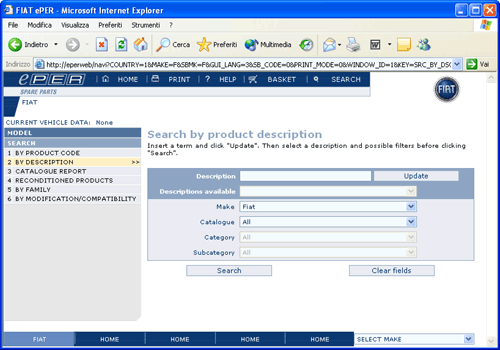
This page allows you to search for products and their particular
applicability starting from their description or a part of
the description.
To proceed:
•
Insert a search term in the first text box and
press the “Update” button next to the text-box.
For example: to search for all the possible product
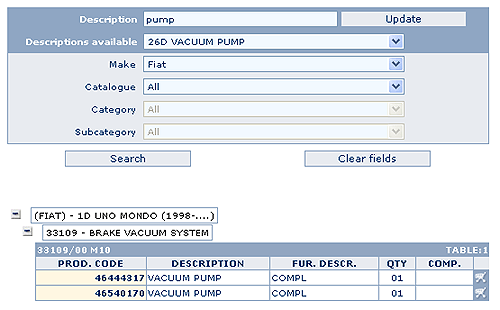
descriptions which contain the word “pump” insert
the word “pump” in the box and press “Update”.
At this point the system creates a list of “Descriptions
available” containing all product descriptions
in which the search term was found
•
Select
the description for which you want to carry out
the search from the “Descriptions available” pull-down
list
•
Optionally,
specify other parameters: Make, Catalogue, Category
and Subcategory. These parameters will be used
to limit the search to applicable products
•
Click
the SEARCH button
If the search is successful the system displays all the products
which have the selected description.
For every product the applicability is displayed: Catalogue,
Category and Subcategory in which the product is found.
Information about the applicability of the product is displayed
on three levels corresponding to the Catalogue, subcategory
and detailed information.
Initially only the list of the Catalogues in which the product
is found is shown, to proceed:
o
Click
on the
icon next to the Catalogue to display the subcategory
o
Click
on the
icon next to the subcategory to display the table
in which the product is shown
o
Click
on the product code if you want to see the complete
table or click on the
icon to insert the product into the shopping basket.







 icon next to the Catalogue to display the subcategory
 icon to insert the product into the shopping basket.