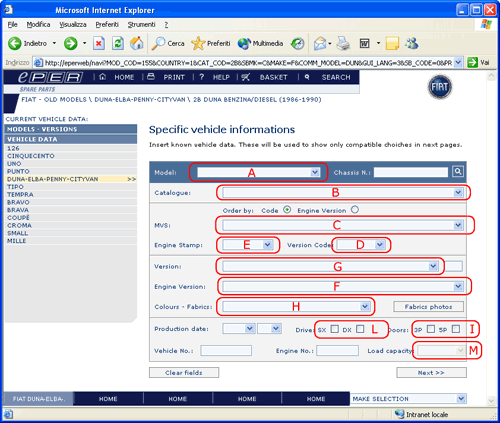
5.3.3. Specific vehicle information. Accessing the database
without a chassis number
Note: The explanations contained in this
page refer to the “manual” selection of vehicle characteristics.
If the chassis number is available the characteristics are
automatically found. In that case see the following
section.
On this page it is possible to specify details about the vehicle,
for example; version number, engine stamp, production date,
etc.
The data inserted in this page allow ePER
to verify subsequently the compatibility of specific products,
listing them as invalid if they are incompatible with the
characteristics selected in this page.
The fields are connected in that once a selection is made
(e.g.: the MVS code of the vehicle) the system automatically
updates the other lists so that incompatible choices are eliminated
Note: some fields (e.g.: the MVS field),
when selected require the page to reload. Therefore you should
wait for the page to refresh before continuing with further
selections.
The fields in the page can be used in various different sequences.
The following discusses the suggested sequences of use:
Proceed according to the following sequence:
•
Select
Model (field A)
•
Select
Catalogue (field B) (if only
one applicable catalogue exists it will be chosen
automatically)
At
this point it is necessary to define the version
of the vehicle.
The priority fields, in which defining a value
is indispensable, are:
•
Field
F: ENGINE STAMP
•
Field G: VERSION
•
Field
H: COLOURS - FABRICS (only when
the search refers to internal finishing.)
•
•
Field I: DOORS (only for models
with 3 or 5 doors)
•
•
Field L: Drive L/R
•
•
Field M: Load capacity (available
only for some commercial models, e.g.: Ducato)
To define/acquire data in the aforementioned fields there
are various possibilities depending on the information available
for the vehicle data.
1
)
1
) (priority) Access by MVS ( Model / Version
/ Series ) :
Select the MVS code ( Field C
) ( Given in the guarantee book and invoice)
The data is automatically placed in the fields
: F-G-I-D-E.
Then select: the Colours/Fabrics code ( where
necessary ) .
2
)
Access
by Version and Engine Stamp . Select Version Code ( Field D
) and Engine Stamp code ( Field E
) . ( Data can be found in the vehicle documentation
)
Then select: the Version ( where there is more
than one ) the number of Doors and the Colours/Fabrics
code ( where necessary ) .
3
)
Access
by Engine Version and Version ( compatibility
of the Catalogue ) .
Select the Engine Version ( Field F
) and the Version ( campo G )
.
Then select: the number of Doors and the Colours/Fabrics
code ( where necessary ) .
Once the vehicle parameters are defined proceed to category
selection by pressing the “Next” button.