The first time ePER
is run it is necessary to configure the language and country
of use.
In ePER’s main dialogue box, the one which contains the ‘SELECT
MAKE’ option, click on “SETUP” – located in the bottom-left.
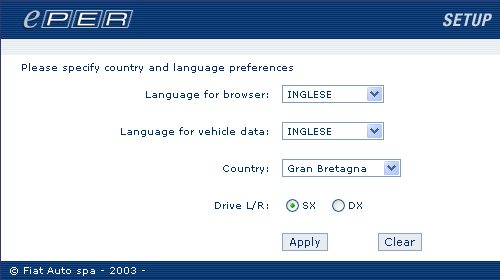
A dialogue box appears similar to the one shown below in which
it is possible to change the settings of the ePER
application
Language for browser: is the language which
ePER will use in its graphical interface, e.g.: to display;
messages, field titles, menus, etc.
Language for vehicle data: is the language
which ePER will use to describe Catalogue components, e.g.:
product descriptions, group and subgroup descriptions, modification
and compatibility descriptions, activation descriptions, etc.
Country: identifies the place in which ePER
is being used. It is important to set this parameter correctly
as it will be used to find the price list and the values of
the Catalogues products.
Drive L/R: defines the position of the driver
(SX=left DX=right) for the current country
Once modified the new settings are confirmed by clicking Apply.
It is possible to change the settings at any time by activating
this dialogue box following the above procedure.