3.1.2. Running and terminating the server component of ePER
EPER is a client/server application,
it consists therefore of two different programs or components
which communicate with each other. The client component is
the Internet Explorer browser while the server component is
a Java (servlet) program. The two components communicate using
http protocol.
It’s important to understand that the server component continues
to run even when the browser is closed.
When you click on the ePER icon
on the desktop or select “ePER”
in the Start->Programs menu, a check is performed to verify
that both components (client and server) are running, if they
are not they are activated in sequence, as follows:
1)
The server component (Java
program) is activate
2)
The client component (Internet
Explorer browser) is activated
The first operation may require some time depending on the
speed of the PC and the second operation will only be started
once the first is done.
Clearly, if the server component is already running, only
the client (browser) component is started.
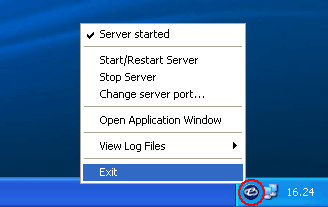
To check if the server component is running look in the Windows
system tray, normally in the lower right-hand corner of the
desktop where the clock is displayed, and check if the ePER
icon is present (circled in red in the example below).
Right-clicking the icon opens a menu with which it
is possible to terminate the server component by selecting
“Exit” (the final option on the menu)
Note: The menu also contains other advanced
options which allow the modification and configuration of
the server configuration. Use of these options is
recommended to expert users only.
Terminating the server component is always necessary
in the following cases:
1)
Before substituting or removing
the CDROM/DVD which ePER
is using.
2)
Before installing a new version
of the ePER program.
3)
Before applying
modifications to the PC network configuration
(e.g.: modifying the IP address)
4)
When you want
to free up resources which ePER uses while running
(memory and CPU)
5)
When ePER
does not appear to be functioning correctly or
the client (browser) component cannot display
ePER pages.