Once installed, ePER can be run
by clicking the program icon on the desktop or selecting “ePER”
in the Start->Programs menu
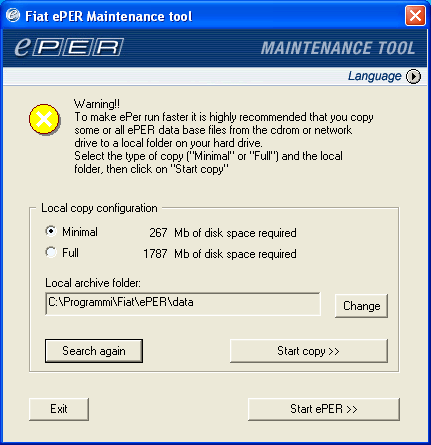
The first time ePER is started,
and whenever necessary, the following dialogue box (“ePER
Maintenance tool”) is displayed:
This dialogue box is displayed to inform the user of the possibility
of optimizing the configuration of ePER
or to announce problem situations, such as; the DVD/CDROM
not being in the drive.
The message contained in the first part of the window contains
information and instructions on how to proceed. For example;
in the case that the ePER DVD/CDROM is not in the drive, the
message will ask for the DVD/CDROM to be inserted and the
“Search again” button to be clicked.
Once the message has been read and the instructions successfully
carried out click on the “Start ePER” button to run the program.